- Out-of-Stock
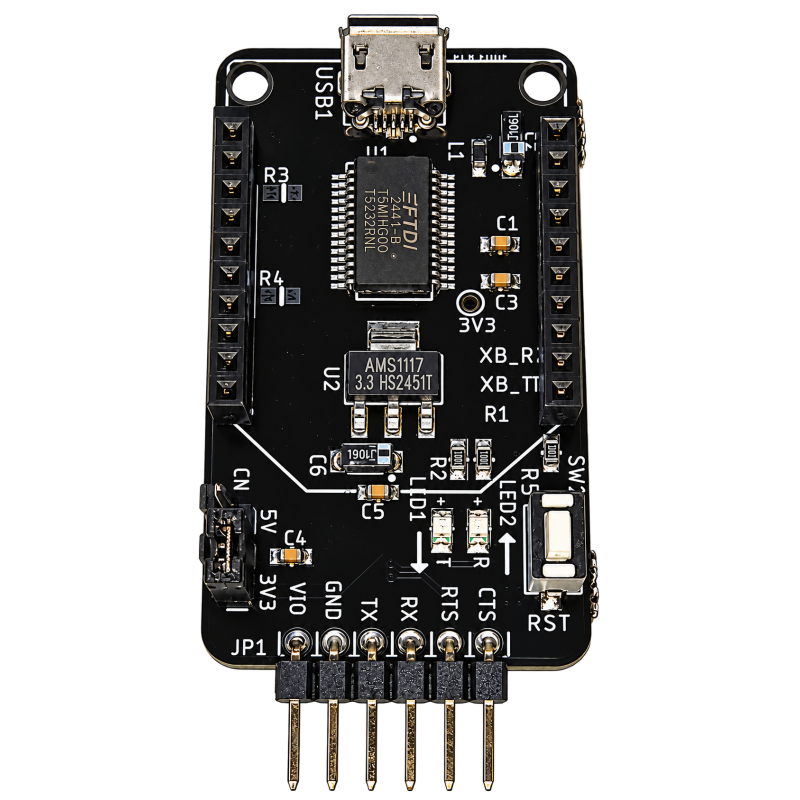

Connect UART devices and compatible XBee-format wireless modules to your computer with this FTDI FT232RNL XC-FT232-USB-UAR converter. Features selectable 3.3 V / 5 V UART logic voltage, RTS/CTS hardware flow control, TX/RX activity LEDs, and a Micro-USB Type-B interface.
 Security policy
Secure checkout and customer information protection.
 Delivery policy
Orders are currently fulfilled through our Shopee store.
 Return policy
Please contact us if you need support for your order.
The FT232RNL USB-to-UART Converter provides a convenient connection between a computer and UART devices for development, debugging, and serial communication. Its XBee-compatible socket also allows direct installation of compatible wireless modules.
FTDI FT232RNL controller: USB-to-UART communication through an FTDI Virtual COM Port driver.
Selectable UART logic voltage: Choose 3.3 V or 5 V using jumper CN1 to match your target device.
UART signals: TX, RX, RTS, and CTS, with RTS/CTS hardware flow control support.
XBee-compatible socket: Connect compatible XBee-format wireless modules directly to the board.
Dedicated 3.3 V auxiliary supply: An on-board regulator powers the XBee-compatible socket independently of the UART logic-voltage selection.
XBee RESET button: Reset the installed wireless module without disconnecting the USB interface.
TX/RX activity LEDs: Monitor serial transmit and receive activity.
Micro-USB Type-B connector: Connect to a computer using a suitable USB data cable.
| Parameter | Specification |
|---|---|
| USB controller | FTDI FT232RNL |
| USB interface | Micro-USB Type-B, USB 2.0 Full Speed |
| UART data rate | 300 baud to 3 Mbaud |
| UART logic voltage | 3.3 V / 5 V selectable |
| UART signals | TX, RX, RTS, CTS |
| Data format | 7 or 8 data bits; 1 or 2 stop bits |
| Parity | None, Odd, Even, Mark, Space |
| Flow control | RTS/CTS hardware or XON/XOFF software |
| XBee-compatible socket supply | 3.3 V |
| PCB dimensions | 45.72 × 25.98 mm |
| Mounting-hole diameter | 3.20 mm |
| Mounting-hole centre spacing | 20.92 mm |
Microcontroller development and debugging
Serial communication with embedded devices
Testing and configuration of compatible XBee-format wireless modules
Connecting 3.3 V or 5 V UART devices to a computer
Select the correct UART logic voltage before connecting your device. Connect the converter’s TX to the target’s RX, RX to the target’s TX, and GND to GND.
This board provides UART logic-level signals, not RS-232 voltage levels. The XBee-compatible socket supply remains at 3.3 V regardless of the CN1 jumper setting. Verify your module’s pinout, logic voltage, and power requirements before installation.
Connect UART devices and compatible XBee-format wireless modules to your computer with this FTDI FT232RNL XC-FT232-USB-UAR converter. Features selectable 3.3 V / 5 V UART logic voltage, RTS/CTS hardware flow control, TX/RX activity LEDs, and a Micro-USB Type-B interface.